High Availability Ceph Cluster: Automating with MicroCeph, Terraform & Ansible
Published on: Monday, March 10, 2025
Introduction
In today's data-driven world, high availability (HA) and scalability are critical for ensuring seamless storage operations. Ceph, a powerful distributed storage solution, provides the reliability and resilience needed for modern infrastructure. But setting up a highly available Ceph cluster can be complex—unless you automate it!
In this blog, I'll walk you through deploying a highly available Ceph cluster using MicroCeph, Terraform, and Ansible—a powerful combination that simplifies provisioning, configuration, and management. Whether you're a DevOps engineer or a system administrator, this guide will help you automate your storage infrastructure with ease. Let’s dive in and make Ceph deployment effortless! 🚀
Overview
We will cover:
- Running pre-deploy operations necessary for a ceph cluster
- Creating/Destroying a HA Ceph Cluster using Microceph and Ansible Provider
- Provisioning OSDs including Loop and Raw drives
- Provisioning and configuring RGW gateways for Users/Accounts management.
- Generating cluster credentials for consumption by Kubernetes Rook operator for an external Ceph Cluster.
Each Ansible Playbook is highly customizable. Feel free to look into each playbook and update as necessary.
Some operations like adding loop drives are not made conditional and hence not dynamic. Feel free to comment out the loop drives sections and any other playbook that you might not need.
This is only an alternative where you don't need a K8s cluster for a Ceph cluster. Ceph clusters can be deployed in K8s directly using Rook-Ceph. This is just an alternative for hosting the cluster across low end devices.
Prerequisites
You will need:
- At least 3 bare-metal devices. This could be any kind of device from VMs on Cloud Providers to bare-metal systems in your home or datacenter. Arm64 devices are supported as well, so you could use SBCs like various Pi devices, or any other commodity hardware.
- Devices should be running Linux Operating Systems that support Snap Daemon.
- You also need hostnames and ssh configs setup before running this.
This blog doesn't cover SSH setup for Ansible access to the hosts. Please refer to my blog for more details how you can secure and tighten SSH access to the servers.
Deploying a High Availability Ceph Cluster
In this section we are going to use Terraform's Ansible Provider to deploy a Highly Available Ceph Cluster.
- Clone the repository and navigate to the ansible-microceph directory.
git clone https://github.com/abasu0713/terrakube.git cd terrakube/ansible-microceph - Lets create a variables file for Terraform and populate it with details about your hosts.
touch variables.auto.tfvarsvariables.auto.tfvarsservers = [ { # Update the hostname as necessary name = "hostname-1", # Update the IP as necessary ip = "", # Update the ssh user ansible will be using as necessary ansible_user = "", drives = ["/dev/sda", "/dev/nvme0n1"], loop_drives = { count = 2, size = "75G", include = true } }, { # Update the hostname as necessary name = "hostname-2", # Update the IP as necessary ip = "", # Update the ssh user ansible will be using as necessary ansible_user = "", drives = ["/dev/sda", "/dev/nvme0n1"], loop_drives = { count = 2, size = "75G", include = true } }, { # Update the hostname as necessary name = "hostname-3", # Update the IP as necessary ip = "", # Update the ssh user ansible will be using as necessary ansible_user = "", drives = ["/dev/sda", "/dev/nvme0n1"], loop_drives = { count = 2, size = "75G", include = true } } ] # Use create/destroy for the corresponding operation cluster_operation = "create" # Update the hostname as necessary. The 1st hostname in the servers variable will be # the active leader of your ceph cluster. So avoid using that as the node to enable RGW gateway on. rgw_nodes = [ "hostname-2", "hostname-3" ] rgw_admin_uid = "rgw-admin-ops-user" # Setup AWS Account based IAM for RGW Gateway rgw_account = { name = "home-lab" email = "admin@<domain>" root_uid = "home-lab-admin" root_uDisplayName = "HomeLabAdmin" } - Now let's run the deployment.
terraform init
terraform fmt .
terraform plan --out plan.txt
terraform apply plan.txt
Once the deployment completes you will have a fully functionaly Ceph cluster with a S3 compatible RGW Endpoint. You should at this point be able to ssh into any of the hosts you specified on the servers variable and validate your operational ceph cluster.
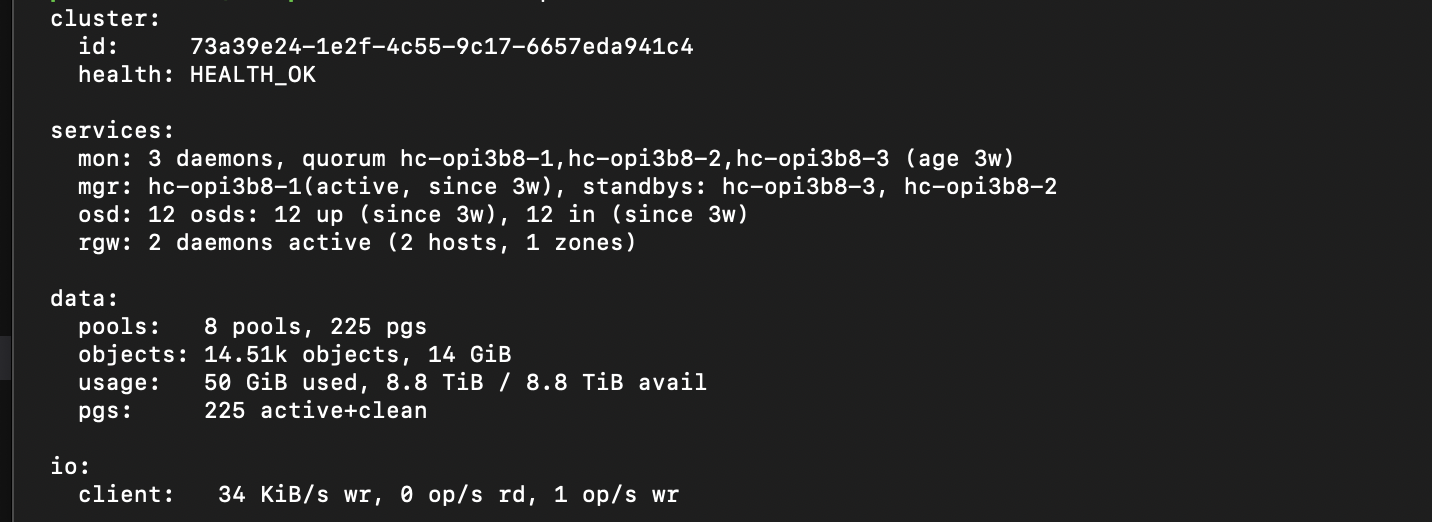
All credentials and configs will be generated in a local folder called .ceph-creds. You can use these credentials to setup a Rook-Ceph cluster in Kubernetes or any other application that needs to consume Ceph storage. And voila, you have a fully functional Ceph cluster running on your devices. You can now use this cluster to store your data and scale it as necessary.
Conclusion
With this we have simplified our Ceph cluster deployment using Terraform and Ansible. This automation can be further extended to include more features like monitoring, alerting, and scaling. The possibilities are endless. If there is any specific feature you'd like to see added, feel free to raise a request on the repository, and I will be happy to add it. In a separate blog we shall see how to use the credentials generated here to setup Kubernetes native storage using Rook-Ceph backed by an external ceph cluster. Stay tuned for that! 🚀