An Introduction to Cloudflare Workers AI
Published on: Monday, December 2, 2024
Introduction
Imagine adding Generative AI capabilities to your web applications without worrying about infrastructure or scaling complexities. With Cloudflare Workers AI, you can do just that—directly at the edge! In this blog, we’ll explore how you can seamlessly integrate Generative AI into your projects in less than 25 lines of code. Whether you're looking to create dynamic content, enhance user interactions, or build smarter workflows, Cloudflare Workers AI simplifies it all with unmatched speed and efficiency. Let’s dive in and see how you can harness this cutting-edge technology to revolutionize your applications.
Overview
In this blog we are going to look into:
Let's dive right in! 🚀
Part 1 - Building a Streaming Server API
When dealing with LLMs the preferred method to handle Text Generation responses is Streaming. LLMs generate responses sequentially, using a process of repeated inference. The full output of an LLM can often be a sequence of hundreds if not thousands of tokens for a single inference/prediction task. While it takes only a few short seconds to generate the first of the tokens in the sequence, generating the full output can often be a bit time consuming.
With Streaming responses you can start displaying your output to your user in a few short moments rather than waiting for the entire response to have generated. In this section, we will look how to implemnting this.
Let's first create a simple streaming server API. I am doing this within a Nuxt Application with Typescript support
export default defineEventHandler(async () => {
  const ai = hubAI(); // access AI bindings
  const responseStream = await ai.run('@cf/google/gemma-2b-it-lora', {
    stream: true,
    messages: [
      { role: "system", content: "You are Alan Watts" },
      {
        role: "user",
        content: "Write 1 inspiring quote that is less than 50 words about hard honest work as if you were Alan Watts",
      },
    ]},
   );
  return sendStream(event, responseStream as ReadableStream);
})
With this you are ready to consume this as a stream from the client side. On to the next step.
Part 2 - Adding AI Gateway
As explained above, using Cloudflare AI Gateway we can enable features like:
Logging
Get insights on requests and errors
Analytics
View metrics such as number of requests, tokens and costs
Caching Responses
Respond from cloudflare cache instead of model provider hence minimizing costs
Rate Limiting
Control Scaling based on number of requests your application receives
Request Fallbacks
Improve resiliency by defining request retries and model fallbacks
Custom providers
Workers AI, OpenAI, Azure OpenAI, Huggingface, Replicate and more work seamlessly with AI Gateway
To do this we need to:
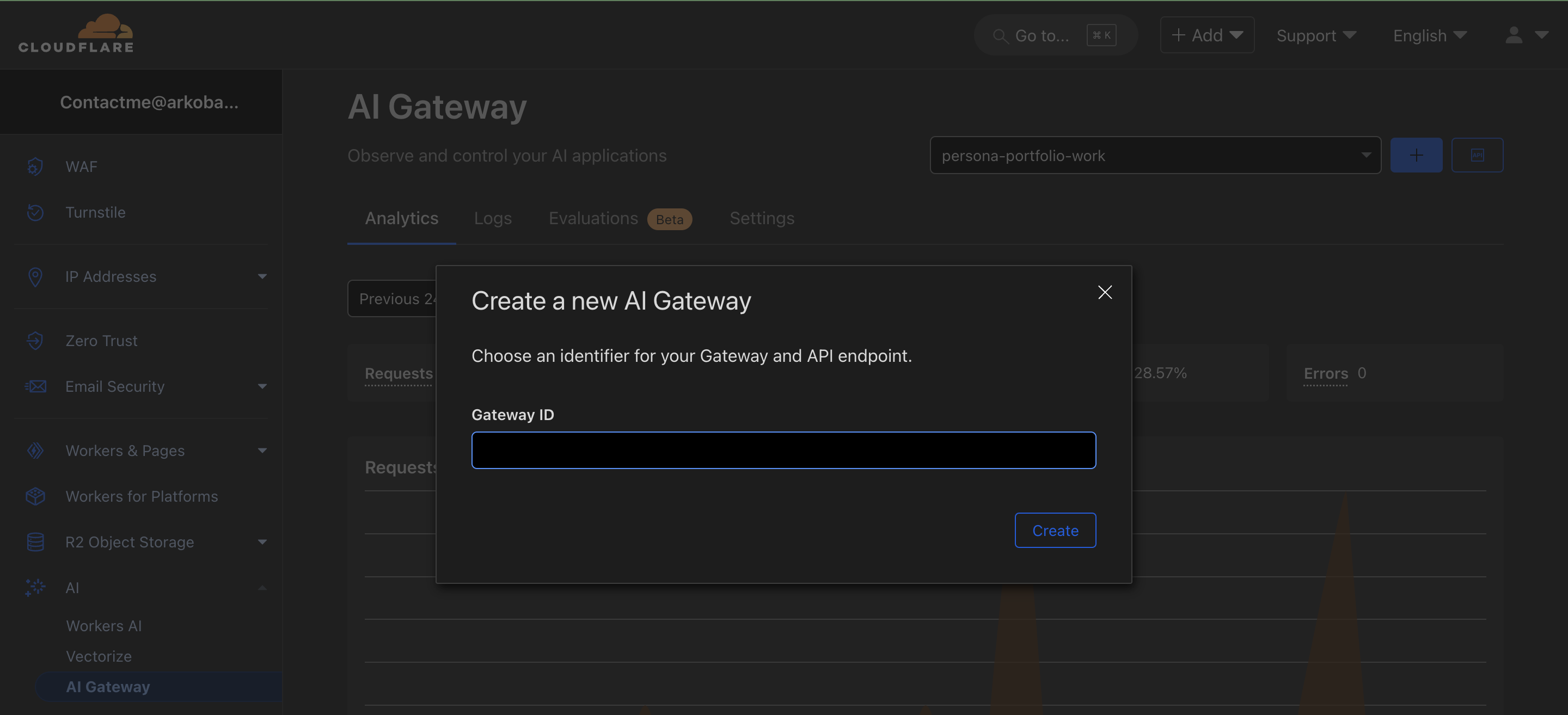
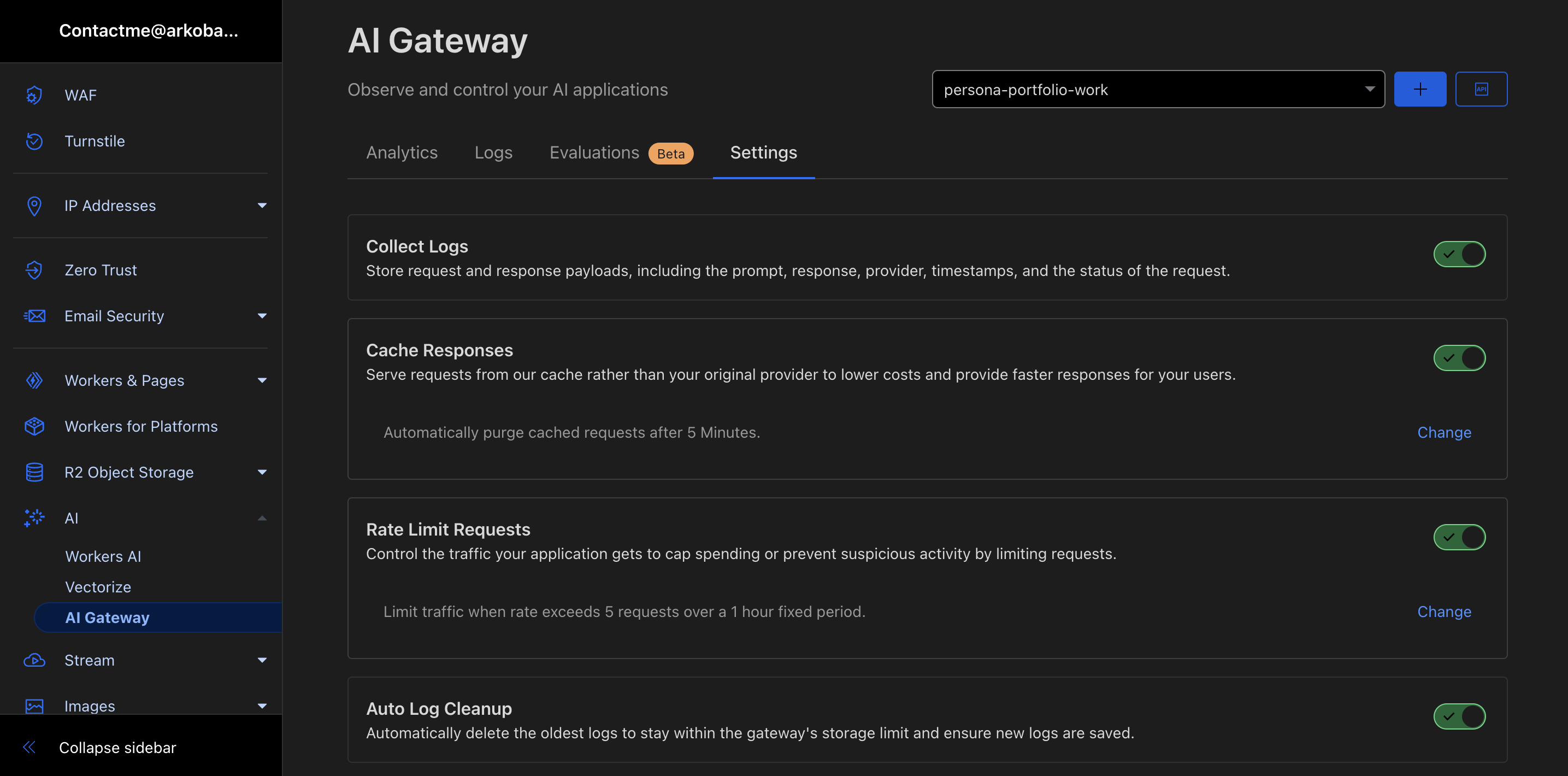
We are now ready to proceed to our next step.
export default defineEventHandler(async () => {
  const ai = hubAI(); // access AI bindings
  const responseStream = await ai.run('@cf/google/gemma-2b-it-lora', {
    stream: true,
    messages: [
      { role: "system", content: "You are Alan Watts" },
      {
        role: "user",
        content: "Write 1 inspiring quote that is less than 50 words about hard honest work as if you were Alan Watts",
      },
    ]},
    {
      gateway: {
        id: 'persona-portfolio-work',
        skipCache: false,
        cacheTtl: 3600,
      }
  });
  return sendStream(event, responseStream as ReadableStream);
})
And voila! Now you have a streaming API that you can deploy that leverages Workers AI. Onto our next step.
Part 3 - Integrating it on client side
At this point we are ready to integrate our streaming responses on the client side. The following Nuxt Component code shows how I integrate it on a client side (with hybrid rendering/hyrdation). You should be able to consume it from any JS based framework in a similar manner.
<script setup>
import { ref, onMounted } from 'vue';
import { animate, stagger } from 'motion';

const quote = ref('');
const error = ref(null);
const isLoading = ref(true);

async function getQuote(){
  try {
    const url = "/api/ai-test";
    const response = await $fetch<ReadableStream>(url, {
      method: 'POST',
      body: {},
      responseType: 'stream',
    })
    const reader = (response as ReadableStream).pipeThrough(new TextDecoderStream()).getReader()
    let buffer = '';
    while (true) {
      const { done, value } = await reader.read()
      // console.log(value);
      if (done) {
        if (buffer.trim()) {
          console.warn('Stream ended with unparsed data:', buffer);
        }
        break
      }
      buffer += value;
      const lines = buffer.split('\n');
      buffer = lines.pop() || '';
      for (const line of lines) {
        isLoading.value = false;
        if(line.startsWith('data: ')) {
          const data = line.slice('data: '.length).trim();
          if (data === '[DONE]') break;

          try {
            const jsonData = JSON.parse(data);
            if (jsonData.response) {
              quote.value += jsonData.response;
            }
          } catch (parseError) {
            console.warn('Error parsing JSON:', parseError);
          }
        }
      }
    }
  } catch (err) {
    console.error(`Error: ${err}`);
    error.value = `An error occurred.`;
  } finally {
    isLoading.value = false;
  }
}

onMounted(() => {
    animate(
        '.loading-container',
        { opacity: [0, 1], y: ["40%", "0%"] },
        { duration: 1, delay: stagger(0.4), repeat: Infinity }
    );
    getQuote();
});
</script>

<template>
  <div class="quote-container">
    <!-- Motion for Loading -->
    <div v-if="isLoading" class="loading-container">
        <div>Generating Quote...</div>
    </div>
    <div v-else-if="error">
      <p>Error in generating quote: {{ error }}</p>
    </div>
    <!-- Motion for Quote -->
    <div v-else class="quote-card-container">
      <p class="quote">{{ quote }}</p><br/>
      <p class="author">— <a href="https://developers.cloudflare.com/workers-ai/models/gemma-2b-it-lora/" target="_blank" class="text-blue-300">@cf/google/gemma-2b-it-lora</a> as Alan Watts</p>
    </div>
    <!-- <h1>Quote</h1> -->
    <!-- <p v-if="error">Error: {{ error }}</p>
    <p v-else-if="quote">{{ quote }}</p>
    <p v-else class="loading-container">Loading...</p> -->
  </div>
</template>

<style scoped>
.quote-container {
  display: flex;
  justify-content: center;
  align-items: center;
  height: auto;
  padding-top: 3rem;
}

.loading-container,
.quote-card-container {
  display: flex;
  flex-direction: column;
  align-items: end;
  height: auto;
}

.quote {
  font-size: 1.25rem;
  font-weight: 600;
  color: #7c7c7c;
}

.author {
  /* margin-top: .25rem; */
  font-size: 1rem;
  font-style: italic;
  color: #b77401;
}
</style>
Load the component on a page and you should see something as this:

As you can see from the above, we now have fully functional client side rendering of streaming responses from our Workers AI implementation. Try refreshing the page (post deployment) and you should be able to see caching and rate limiting behaviors.
Conclusion
Pardon the crude implementation. This is a bare-bone implementation of the Streaming API responses from Workers AI. Please refer to each model's documentation on futher input parameters that allow you to control text generation with great granularity. Hope this is of help and of someone's use.